AI Proposal Writing Assistant: Cut Draft Time by 60%
August 18, 2025
By
Evie Secilmis


Think of your proposal team as a world-class kitchen and your proposal manager as the head chef. The chef’s job is to create a masterpiece—the perfect strategy and a final proposal that wins the client. They shouldn't be stuck chopping vegetables. An AI proposal assistant is the ultimate sous chef. It handles the prep work: organizing ingredients from your content library, drafting foundational elements, and ensuring consistency. This frees up your head chef to apply their expertise, turning a good proposal into an unforgettable one. We’ll show you how to find the best AI for proposal writing for your team.
Key Takeaways
- Focus your team on strategy, not busywork: Let an AI assistant handle the heavy lifting of first drafts and research. This frees up your experts to personalize proposals and build the client relationships that actually close deals.
- Select a tool that fits your workflow, not the other way around: Look beyond flashy features and prioritize an AI assistant with robust security, seamless integrations with your existing tech, and a focus on the specific documents your team handles.
- Implement a clear process to maximize your return: To see a real impact on your win rate, build a smart workflow that includes writing clear prompts, getting team buy-in, and establishing a mandatory human review to ensure every proposal is accurate and persuasive.
What Is an AI Proposal Writing Assistant?
An AI proposal writing assistant is a tool designed to help you and your team create proposals more efficiently. Think of it as a smart partner that streamlines the entire process, from the first draft to the final submission. Instead of starting with a blank page, these assistants use artificial intelligence to generate high-quality, persuasive content quickly. They are built to handle the heavy lifting of proposal creation, so your team can focus more on strategy and less on tedious writing and formatting.
So, What Can It Actually Do?
At its core, an AI proposal assistant helps you write. You can start with a simple idea or a "prompt," and the AI will help you brainstorm and draft entire sections of your proposal. Many tools, including Iris, also let you upload your own documents—like past proposals or product specs—to create new content that is perfectly aligned with your company's voice. Beyond just writing, these assistants can offer strategic advice and help with visual elements, ensuring your final document is professional and polished. It’s a comprehensive solution for getting your best ideas on paper.
How AI Makes Your Proposals Stronger
The most immediate improvement you'll see is speed. Teams report writing proposals up to five times faster, effectively cutting their writing time in half. But it’s not just about working faster; it’s about working smarter. AI tools help you write stronger proposals by automating research and ensuring every response is accurate. This frees up your team to concentrate on strategy. By handling the repetitive work, the AI helps you produce higher-quality proposals consistently, which can directly improve your win rates and give you a competitive edge.
What Kinds of Proposals Can It Handle?
A good AI proposal assistant is incredibly versatile. You can use it to create a wide range of proposals for business projects, sales, grants, and research. For sales and proposal teams, these tools are especially powerful for responding to complex documents like Requests for Proposals (RFPs), Requests for Information (RFIs), Statements of Work (SOWs), and security questionnaires. The right AI-powered platform adapts to your specific needs, making it an essential tool for any team that regularly creates persuasive business documents to drive growth.
The Best AI for Proposal Writing: Our Top Picks
Finding the right AI proposal assistant can feel like a huge task, but it really comes down to matching a tool's strengths to your team's specific needs. Some platforms are all-in-one powerhouses for sales documents, while others are laser-focused on specific areas like grant writing or RFP responses. To help you sort through the options, I’ve put together a list of some of the top players in the game. We'll look at what makes each one stand out, so you can find the perfect fit for creating winning proposals without the usual headache.
1. HeyIris.ai
If your team is tired of staring at a blank page when an RFP lands, HeyIris.ai is designed to solve that exact problem. It’s a sharp AI tool that helps you streamline the entire RFP process from start to finish. Instead of building from scratch, Iris generates a well-structured first draft, which is a massive time-saver. What I find particularly smart is its proactive approach to information management. The system automatically flags outdated or inconsistent information across your documents, so your team can stop worrying about accuracy and focus on creating compelling, high-quality responses that win deals. It’s a great fit for sales teams looking to improve both speed and efficiency.
2. PandaDoc
PandaDoc is more than just a proposal writer; it’s a complete document automation platform. It’s designed to handle the entire lifecycle of your sales documents, from creation to close. You can build, send, and track proposals, but the real power comes from its integrated features. It includes built-in e-signatures, which makes getting approvals a breeze, and even has payment processing to help you get paid right from the proposal itself. With its comprehensive automation capabilities, PandaDoc is perfect for teams that want to manage all their contracts, quotes, and proposals in one place and speed up the entire sales cycle from the initial pitch to the final signature.
3. RFPIO
For teams that live and breathe RFPs, RFPIO is a specialized powerhouse. It’s built specifically for the complexities of RFP management, and its core strength lies in its AI-powered content library. This feature lets you store and intelligently reuse past responses, which dramatically cuts down the time spent answering repetitive questions. You can build a library of your best content and let the AI suggest answers for new proposals. RFPIO also integrates with popular CRM systems like Salesforce, which helps create a more connected and efficient workflow. If your organization handles a high volume of RFPs, this tool can be a game-changer.
4. Grantable
If your world revolves around grant writing, Grantable is a tool you’ll want to check out. It’s designed specifically to help nonprofits and other organizations secure funding. The platform simplifies the often-overwhelming process of grant applications by providing templates and guidance tailored to the unique requirements of grant proposals. It helps you structure your narrative and present your case in the most effective way. Plus, its collaboration features are a huge help, allowing your entire team to contribute to the submission seamlessly. It’s a focused solution that takes much of the guesswork out of crafting compelling grant applications so you can focus on your mission.
5. Loopio
Loopio is another excellent choice for teams that need to conquer RFPs, security questionnaires, and other complex sales documents. Much like RFPIO, its strength is a centralized content library that acts as your team's single source of truth. You can store your best answers and let Loopio’s automation features pull them into new projects, which saves a ton of time and ensures consistency. It’s also highly collaborative, making it easy for subject matter experts across your company to contribute and review content. Loopio helps teams work together more effectively, ensuring every proposal is accurate, comprehensive, and polished before it goes out the door.
Beyond All-in-One Platforms: Other AI Tools for Proposal Writers
While a comprehensive platform is often the best way to manage your entire proposal workflow, sometimes you need a specialized tool for a specific task. Think of it like stocking your kitchen—you have your main appliances, but you also need a great knife for chopping or a specific pan for searing. The same goes for your proposal toolkit. Integrating a few specialized AI tools can help you brainstorm fresh ideas, add a final layer of polish, or tackle unique challenges like visual design or government compliance. Here are a few categories of tools that can complement your primary proposal software.
General AI Chatbots for Brainstorming and Drafting
Sometimes, the hardest part of writing is just getting started. General AI chatbots like ChatGPT or Claude can be fantastic brainstorming partners. You can use them to explore different angles for an executive summary, outline a complex section, or even draft initial responses to straightforward questions. The key is to remember that the quality of the output depends entirely on the quality of your input. As many professionals have found, these tools are most effective when you provide detailed, specific prompts. Think of them less as a final writer and more as a creative assistant to help you overcome writer's block and get your initial thoughts on the page.
Editing and Rewriting Tools for Polishing Content
Once your draft is complete, ensuring it's clear, professional, and error-free is critical. This is where AI-powered editing tools shine. Services like Grammarly go far beyond basic spell-checking, offering suggestions to improve sentence structure, clarity, and tone. When multiple team members contribute to a single proposal, these tools are invaluable for maintaining a consistent voice throughout the document. They act as a final quality check, catching awkward phrasing or grammatical mistakes that are easy to miss after you’ve read the same text a dozen times. This final polish can make the difference between a good proposal and a great one.
Grant Discovery and Management Platforms
For organizations in the nonprofit sector, the proposal process often starts with finding the right funding opportunity. Specialized platforms like Instrumentl use AI to streamline the entire grant lifecycle. Instead of just helping you write, these tools maintain massive databases of funders and grants, using AI to match your organization with the most relevant opportunities. They can also help manage deadlines, track application progress, and organize reporting requirements. This type of AI tool is a perfect example of a specialized solution that addresses the unique challenges of a specific industry, handling everything from discovery to final submission.
Visually-Focused Generators for Engaging Design
Let's be honest: a wall of text is never appealing. The visual presentation of your proposal matters, and AI can help with that, too. Tools like Piktochart are designed to create professional, visually engaging documents quickly. Their AI can help generate not just the text but also the layout, incorporating your branding and adding relevant graphics to make the proposal easier to read and more impactful. A well-designed proposal shows a level of care and professionalism that sets you apart from the competition. Using an AI design tool can help you create a polished final product without needing a graphic designer on standby.
Specialized Tools for Government Contracting
Responding to government proposals comes with its own unique set of rules, regulations, and acronyms. It’s a world where precision and compliance are everything. For teams working in this space, specialized AI tools trained on government contracting data can be incredibly useful. Platforms like GovGPT are built to understand the specific language and formatting requirements of federal, state, and local government bids. This specialization allows them to automate tasks and generate content that is already aligned with strict government standards, saving your team valuable time on research and compliance checks.
What to Look For in an AI Proposal Writing Tool
Not all AI proposal writers are created equal. To find a tool that genuinely streamlines your workflow and helps you win more deals, you need to look beyond the hype. The best platforms are built with specific, powerful features designed to tackle the real-world challenges of proposal creation. From generating content in a flash to ensuring your data stays secure, these are the core functionalities that separate a helpful gadget from an indispensable part of your sales toolkit. When you're evaluating your options, make sure these six features are on your checklist.
Generate Content in Seconds
The most significant advantage of an AI proposal writer is speed. You shouldn't have to wait long for the magic to happen. A top-tier tool can take your basic ideas or a few key inputs and produce a complete, well-structured first draft in seconds. This feature is about eliminating the "blank page" problem and giving your team a massive head start. Instead of spending hours writing from scratch, you can get a draft that's 80% of the way there, allowing you to focus your energy on strategic refinement and personalization. This capability dramatically shortens your sales cycle and lets you respond to opportunities faster than the competition.
Manage Your Templates with Ease
Consistency is key to building a strong brand and an efficient process. Your AI assistant should come equipped with a library of professional templates for various document types, like business proposals, SOWs, and security questionnaires. More importantly, it should allow you to create, save, and manage your own custom templates. When you land on a winning formula, you need an easy way to replicate that success. A great tool lets you build a repository of your best content and structures, ensuring every proposal that leaves your office is polished, professional, and perfectly on-brand, without having to reinvent the wheel every time.
Collaborate Effortlessly with Your Team
A proposal is rarely a solo effort. Your AI tool should function as a central hub where your entire team can work together effectively. Look for features that allow for real-time co-editing, commenting, and clear approval workflows. This eliminates the chaos of emailing different versions back and forth and ensures everyone is on the same page. When your subject matter experts, sales reps, and leadership can all contribute within a single platform, you not only speed up the process but also improve the quality of the final document. The AI handles the heavy lifting, letting your team focus on strategy and collaboration.
Get Help with Research
A winning proposal is a well-informed one. The most advanced AI tools offer more than just writing; they provide research assistance. This can involve automatically pulling relevant information from your internal knowledge base, such as past proposals, case studies, and technical documentation. An AI assistant with a robust knowledge management system can instantly find the most relevant and up-to-date answers to questions in an RFP. This saves your team from the tedious task of digging through old files and databases, ensuring your proposal is tailored, accurate, and packed with compelling evidence.
Ensure Quality and Accuracy
An AI is a powerful assistant, but it’s not infallible. That's why built-in quality controls are non-negotiable. A reliable tool should include checks for grammar, spelling, and tone to ensure your proposal is professional and easy to read. Even better, some platforms like Iris can proactively scan your content library to flag outdated or inconsistent information before it ever makes it into a proposal. This automated oversight provides a crucial layer of quality assurance, giving you confidence that every document you send is accurate, current, and reflects the best of what your company has to offer.
Keep Your Data Secure
Your proposals contain sensitive business information, from pricing and strategy to client details. You can't afford to compromise on security. Before committing to any AI tool, verify its security protocols. A trustworthy provider will offer enterprise-grade security, be transparent about its data handling policies, and guarantee that your proprietary information is kept private. Your content should never be used to train public AI models. Look for platforms that provide detailed information on their security posture, often found in a company whitepaper, to ensure your data and your clients' data are fully protected.
Automatic Branding and Design
Your proposal's look and feel matter just as much as the words inside. A polished, professional design shows you’re serious and detail-oriented, but getting the branding right on every document can be a tedious manual process. This is where some AI tools really shine. For example, certain platforms can scan your company website, automatically pulling your logo, color palette, and fonts to create a perfectly branded proposal in an instant. This feature ensures every document you send is consistent and professional, reinforcing your brand identity without you having to touch a single design setting. It’s like having a graphic designer on call, ready to format your documents perfectly every time.
Proposal Tracking and Analytics
Hitting 'send' on a proposal can feel like sending it into a black hole. Did they open it? Which sections did they focus on? The best AI proposal platforms remove this guesswork by providing detailed tracking and analytics. You can see exactly when your proposal is opened, who viewed it, and how much time they spent on each section. This insight is invaluable for timing your follow-up perfectly. Some tools go even further, functioning as complete document automation platforms. They integrate features like e-signatures to make approvals seamless and even include payment processing, allowing you to close the deal and get paid directly from the proposal. It’s about shortening the distance from pitch to payment.
Interactive Pricing Tables
A static pricing table can sometimes create a roadblock. If the numbers aren't quite right, it can lead to a lengthy back-and-forth negotiation. Modern proposal tools are changing this by incorporating interactive pricing tables. Instead of a fixed list, you can give your clients options. Imagine a proposal where the client can adjust quantities, select optional services, or choose different package tiers, with the total updating in real time. This transforms your proposal from a static document into a dynamic, collaborative workspace. It empowers your clients to build a solution that fits their exact needs and budget, which can significantly shorten the negotiation cycle and get you to a 'yes' faster.
How to Choose the Right AI Proposal Tool for You
With so many options out there, picking the right AI proposal assistant can feel like a big decision. The key is to find a tool that fits your team’s specific workflow and goals. It’s not about finding the tool with the most features, but the one with the right features for you. Let’s walk through the essential factors to consider so you can choose a platform that helps you save time and win more deals.
Start with Your Business Needs
Before you even look at a demo, take a moment to map out your current process and pinpoint your biggest challenges. Are you struggling to respond to RFPs quickly enough? Is maintaining brand consistency across proposals a constant headache? Or is your main goal to improve the overall quality of your submissions? AI tools can make the process faster, help write stronger proposals, and automate research. Knowing what you want to fix will help you zero in on a solution that provides real value. Consider the types of documents you handle most—RFPs, RFIs, SOWs, or security questionnaires—and look for a tool built to manage that complexity.
Think About Your Industry
Not all AI proposal tools are created equal. Some are general-purpose, while others are designed with specific industries in mind. A tool tailored for a nonprofit writing grants will have different strengths than one built for a tech company responding to complex security questionnaires. For example, if you frequently respond to government bids, you’ll want a tool that understands the specific requirements and formats of that sector, like the solutions offered through the GovSpend and Iris partnership. When you’re evaluating options, ask if the tool has experience or templates relevant to your field. This specialization can make a huge difference in the quality and relevance of the content the AI generates.
Know Your Budget
Pricing for AI tools can vary widely, from simple per-user monthly subscriptions to custom enterprise plans. While it’s tempting to go for the cheapest option, it’s more effective to think about the return on investment (ROI). Calculate how many hours your team currently spends on proposals and what that time is worth. A tool that costs a bit more but cuts your response time in half and increases your win rate will pay for itself quickly. Look for transparent pricing and be wary of hidden fees. Don’t be afraid to request a demo to get a clear understanding of the total cost and the value you’ll receive.
Subscription vs. Credit-Based Models
When you're looking at pricing, you'll generally run into two main types: subscription and credit-based. A subscription model is straightforward—you pay a flat monthly or annual fee for access. This is often the best bet for active teams because it offers predictable costs and allows you to create as many proposals as you need without worrying about hitting a limit. On the other hand, a credit-based system has you pay as you go. You buy a bundle of credits and use them for specific actions, like generating a document or using an AI feature. While this can seem cheaper for very infrequent use, the costs can quickly become unpredictable and add up, especially when you're on a deadline. For most sales teams, a subscription provides better long-term value and peace of mind.
Understanding Free Trial Limitations
A free trial is your best opportunity to see if a tool is a good fit, but it's important to know what you're getting into. Most trials come with limitations designed to give you a taste of the platform without giving everything away. For example, you might be capped at creating just three proposals during a 14-day period, or you may be given a set number of "AI credits" to use on specific features. Before you start, read the fine print so you can plan your test drive effectively. Use the trial to work on a real proposal, if possible. This will give you the clearest picture of how the tool performs under pressure and whether it truly streamlines your workflow before you commit.
Look for Key Integrations
Your AI proposal writer shouldn’t operate in a silo. For it to be truly effective, it needs to connect seamlessly with the tools your team already uses every day. Think about your CRM (like Salesforce), cloud storage (SharePoint, Google Drive), and communication platforms (Slack, Teams). The right integrations ensure that your proposal content is always drawing from the most current data, from customer information to product specs. A platform like Iris can proactively identify outdated information across your connected systems, ensuring every proposal is accurate. This connectivity prevents duplicate work and makes the entire process smoother for your team.
Confirm Security Standards
Proposals are filled with sensitive information—your company’s intellectual property, financial details, and client data. Handing that over to an AI tool requires trust. Before you commit, dig into the platform’s security protocols. Look for certifications like SOC 2 compliance, which indicates a high standard for data management. It’s also critical to understand their data privacy policy. You need to confirm that your private company information stays private and is never used to train public AI models. Any reputable provider will be transparent about their security measures because they know it’s a top priority.
Don't Forget Customer Support
Even the most intuitive software comes with a learning curve. When you’re on a tight deadline, the last thing you want is to get stuck on a technical issue. Great customer support can be a lifesaver. As you evaluate different tools, look at their support options. Do they offer comprehensive onboarding to get your team up and running? Is there a detailed knowledge base you can reference? Most importantly, what do current customers say about their responsiveness? Good support allows your team to focus on high-level strategy instead of getting bogged down in software troubleshooting, which is the entire point of adopting an AI assistant.
Getting the Most from Your AI Proposal Assistant
Once you’ve chosen an AI proposal writer, the next step is to weave it into your team’s daily rhythm. Simply having the tool isn’t enough; using it strategically is what separates the teams that see a real return from those that don’t. An AI assistant should feel like a natural extension of your team, taking on the heavy lifting so you can focus on strategy and relationships. By setting up smart processes from the start, you can make sure you’re getting the most out of your new tech. It’s all about creating a system where the AI handles the repetitive work, freeing up your team for the high-value tasks that actually close deals. This isn't about replacing your team's judgment but augmenting their skills to produce better work, faster.
Create a Smarter Workflow
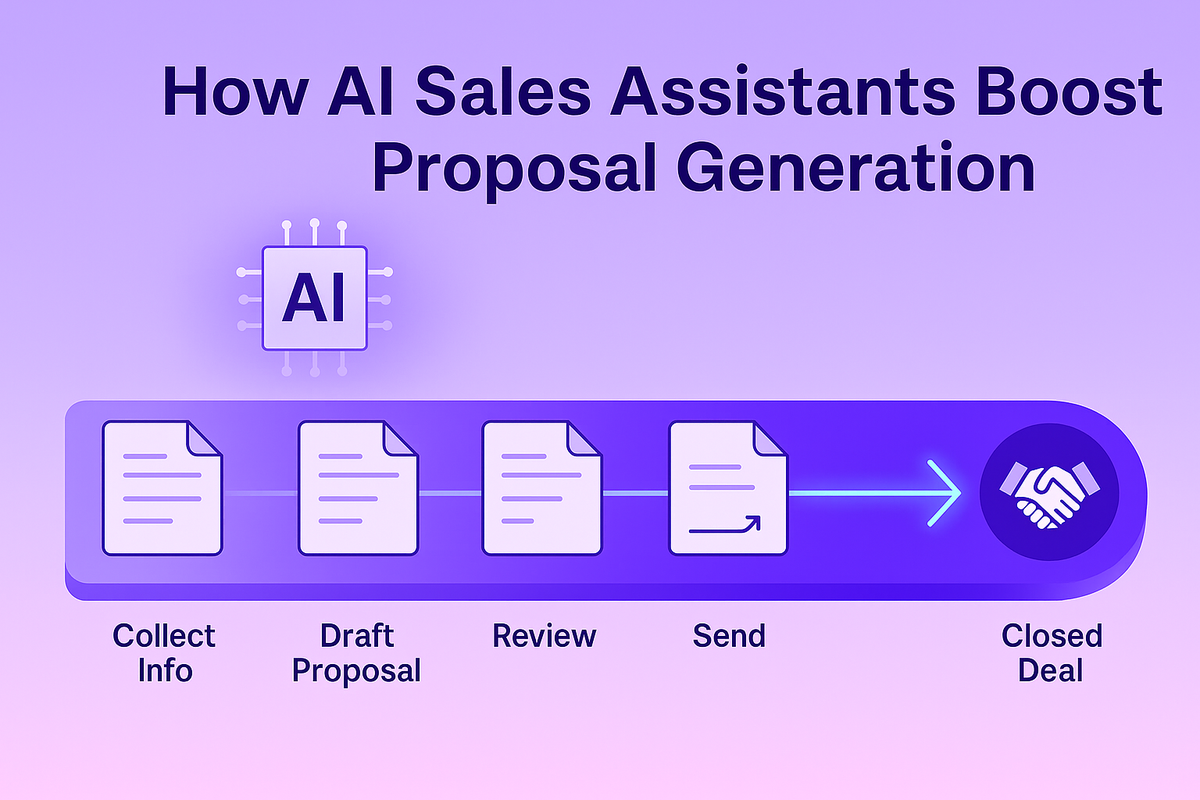
Don’t just drop an AI tool into your existing process and hope for the best. Take a moment to map out your entire proposal workflow, from the initial request to the final submission. Identify the bottlenecks and time-consuming steps where your AI assistant can make the biggest impact. For many teams, this means using the AI to generate the first draft, conduct initial research, or pull standard company information. An effective AI deal desk solution can automate these early stages, giving your team a solid foundation to build upon. This approach makes the process faster and helps you create consistently strong proposals every time, turning a chaotic scramble into a streamlined, repeatable system.
Master the Art of the Prompt
The quality of your AI’s output is directly tied to the quality of your input. Think of it as giving instructions to a new team member—the more specific and contextual you are, the better the result will be. Instead of a vague request like "write a proposal," provide detailed prompts. Include the client’s name, their known pain points, the specific services you’re offering, and the desired tone of voice. This practice, often called prompt engineering, is key to getting relevant and persuasive content. The better you get at writing clear instructions, the less time you’ll spend editing and the more the AI will feel like a true partner in the process.
Always Have a Human Review
Your AI assistant is incredibly powerful, but it’s not infallible. It’s crucial to establish a human-led review process for every document the AI generates. Treat the AI’s output as a strong first draft, not the final product. Your team’s expertise is what adds the final layer of polish, personalization, and strategic insight. Create a simple checklist for reviewers: Is the information accurate? Does it match our brand voice? Is it tailored to the client’s specific needs? Tools like Iris help by proactively identifying outdated information, but a final human check ensures every proposal is perfect before it goes out the door. This keeps quality high and protects your brand's reputation.
Train the AI with Your Company Data
The real power of an AI assistant comes from its ability to learn your business inside and out. Generic AI models are great, but they don't know your specific wins, your unique voice, or your technical details. That’s why it’s so important to train your AI with your own company data. As one user on Reddit noted, training AI with past proposals is critical because there aren't many public examples for it to learn from. By feeding your platform a steady diet of your best content—winning proposals, detailed case studies, security documents, and product specs—you create a single source of truth. This transforms your AI from a general writer into a specialized expert on your company, ready to generate highly relevant and accurate responses that reflect your proven strategies.
Combine Tools to Create a 'Tool Stack'
Your AI proposal writer is a powerful engine, but it runs best when it’s connected to the rest of your sales machinery. The most efficient teams don't rely on a single, magical tool; they build a "tool stack" where each component works together. Your AI assistant should be the hub, but it needs to integrate seamlessly with your CRM, cloud storage, and communication platforms. This creates a smooth flow of information, ensuring your proposals are always built with the latest customer data and company information. When you choose an AI assistant, look beyond flashy features and prioritize robust security and seamless integrations with your existing tech. This connected approach eliminates data silos and turns your collection of software into a cohesive, deal-closing system.
Train Your Team for Success
For an AI tool to be truly effective, your entire team needs to be on board. Start by clearly communicating the "why" behind the new software—how it will reduce tedious work, speed up response times, and help everyone hit their goals. Provide hands-on training and create a space for team members to share tips and best practices. When your team sees how the right platform can help them improve deal volume and win rates, adoption will happen naturally. Fostering a collaborative environment where everyone feels comfortable using the tool is the best way to integrate it successfully into your sales culture and see its full potential.
Measure Your Results
How do you know if your AI assistant is actually working? You need to track your performance. Before you even start, benchmark your current metrics. How long does it take to respond to an RFP? What’s your current win rate? How many proposals can your team handle per quarter? Once the AI tool is implemented, track these same KPIs over time. Seeing a measurable decrease in response time or an increase in proposal quality provides clear evidence of your ROI. This data not only justifies the investment but also helps you identify areas where you can further optimize your process to improve your win rates even more.
Debunking Common Myths About AI Proposal Writers
As AI becomes a bigger part of our work lives, it’s natural for some confusion and myths to pop up. When it comes to AI proposal writers, separating fact from fiction is key to using these tools effectively. Let's clear the air and look at what these assistants can—and can't—do for your sales team. Understanding the reality of AI helps you set the right expectations and build a workflow that truly supports your team in closing more deals.
Myth #1: AI Will Replace Your Team
Let’s get this one out of the way first: AI is here to assist your team, not replace it. Think of an AI proposal writer as a highly efficient co-worker who handles the tedious parts of the job, like pulling standard company information or structuring the initial draft. This frees up your proposal managers and sales experts to focus on what they do best: strategy, customization, and building client relationships. The AI provides the foundation, but your team’s knowledge, judgment, and unique voice are what turn a good proposal into a winning one. The human touch remains your most valuable asset; AI just helps you apply it more effectively.
Myth #2: It's Always 100% Accurate
While AI is incredibly powerful, it’s not infallible. AI models can sometimes generate information that sounds plausible but is incorrect, a phenomenon often called "hallucination." This is why human oversight is non-negotiable. Your team must review and fact-check any AI-generated content before it goes to a client. However, specialized tools like HeyIris.ai significantly reduce this risk by drawing from your company’s own verified content library. This ensures the information is not just accurate but also consistent with your brand messaging, though a final human review is always a smart final step.
Myth #3: It Perfectly Understands Context
AI processes information based on patterns and data, but it doesn't truly "understand" context the way a person does. It can’t read between the lines of an RFP to grasp a client’s unstated needs or appreciate the nuances of your relationship with them. This is where your team’s expertise is critical. An AI assistant can generate a technically sound response, but a human is needed to infuse it with empathy, strategic insight, and the specific details that show the client you truly get them. The AI provides the "what," while your team provides the "why" that makes your proposal compelling.
Myth #4: Any AI Tool Will Do the Job
Using a generic AI chatbot for a complex business proposal is like using a butter knife to cut down a tree—it’s the wrong tool for the job. General AI models lack the specific features needed for effective proposal management. A dedicated AI proposal assistant is designed with the entire RFP lifecycle in mind. It offers features like secure content libraries, template management, collaboration tools, and integrations with your existing sales software. These specialized platforms are built to handle the complexities of RFPs, RFIs, and security questionnaires, providing a much more reliable and efficient solution than a general-purpose tool.
Myth #5: It's a "Set It and Forget It" Solution
An AI proposal writer is a massive time-saver, but it’s not a magic button. You can’t just input a request and send the output directly to a client without a second glance. The most effective way to use these tools is as a collaborative partner. The AI generates a strong first draft in minutes, saving your team hours of work. From there, your team steps in to refine, customize, and personalize the content. This human-in-the-loop process ensures the final proposal is not only accurate and complete but also carries your company’s authentic voice and strategic edge.
How to Maximize Your ROI with an AI Proposal Writer
When you invest in a new tool, you want to see clear, measurable results. An AI proposal writing assistant is no different. The return on investment isn't just about saving a few hours here and there; it's about transforming how your team operates and competes. The real value comes from a combination of speed, quality, and efficiency that directly impacts your bottom line. By automating the tedious, time-consuming parts of proposal creation, you free up your team to focus on what truly matters: strategy, client relationships, and crafting a message that resonates.
Think of it as a force multiplier for your sales and proposal teams. Instead of getting bogged down in finding the right boilerplate text or formatting documents, your experts can spend their time tailoring proposals to the specific needs of each client. This shift from administrative work to strategic work is where you’ll find the most significant gains. The right AI tool doesn’t just help you do the same work faster; it helps you do better work, which leads to more wins and a healthier sales pipeline. Let’s break down exactly how you can expect to see a return on your investment.
Respond to RFPs Faster
In the world of sales and grants, timing is everything. Being the first to submit a high-quality proposal can give you a serious competitive edge. AI assistants are designed to accelerate this process dramatically. Instead of starting from scratch, your team can generate a complete first draft in minutes, pulling from a library of your best and most current content. As one source notes, AI tools can make the process faster, helping you write strong proposals and automate research. This speed allows you to respond to more opportunities without sacrificing quality, ensuring you never miss a deadline or a chance to win.
Write Higher-Quality Proposals
A faster proposal is great, but a better proposal is what closes deals. AI assistants help you maintain consistency and accuracy across all your documents, ensuring every proposal reflects your brand’s best self. These tools can analyze the request and suggest the most relevant and persuasive content from your knowledge base. This means your proposals are not only well-written but also perfectly tailored to the client's requirements. By leveraging AI, you can consistently improve the quality of proposals, making them more compelling, professional, and likely to stand out from the competition.
Win More Bids
Ultimately, the goal is to win more business. Speed and quality are the key ingredients that lead to a higher win rate. When your team can produce top-tier proposals in a fraction of the time, they can respond to more RFPs and grant opportunities. This increased volume, combined with higher quality, naturally leads to more success. Some users have reported writing proposals up to five times faster, which allows them to apply for more grants and ultimately increase their win rate. You can see how this plays out in the real world by looking at company case studies that show tangible improvements in deal volume and wins.
Free Up Your Team for High-Value Work
Your team’s time is your most valuable resource. Every hour spent on repetitive administrative tasks is an hour not spent on strategic planning or building client relationships. An AI proposal assistant automates the grunt work, freeing your team to focus on high-impact activities. This shift is crucial for morale and productivity. Using these tools can significantly cut down the time you spend on each proposal, allowing your team to concentrate on the core mission of your business. It’s not about replacing your experts; it’s about empowering them to work smarter and more effectively.
Calculate the Real Cost Savings
The financial return on an AI proposal writer is straightforward: time saved is money saved. Calculate the hours your team currently spends on writing, editing, and formatting proposals, and then consider how much of that can be automated. An AI proposal generator saves a lot of time that would otherwise be spent on manual work. This reduction in labor hours translates directly into cost savings, allowing you to allocate your budget to other growth areas. The efficiency gains also mean you can handle a higher volume of proposals without needing to expand your team, further improving your ROI.
Quantify the Time Savings
"Saving time" is a promise you hear a lot, but let's put some real numbers on it. The impact of an AI assistant isn't just about shaving a few minutes off your process; it's about fundamentally changing how your team spends its days. For example, some teams report they can write proposals up to five times faster, effectively cutting their writing time in half. Imagine what that means for your pipeline. A proposal that used to take a full week of tedious work might now be drafted and ready for review in just a day or two. This isn't just an efficiency gain; it's a strategic advantage. It frees up your experts to move from administrative tasks to the high-value work of personalizing content and building relationships, which is where the most significant gains are found.
Understanding the Limitations of AI Proposal Writers
AI proposal writers are incredible tools, but they aren’t magic wands. Understanding their limitations is the key to using them effectively and avoiding common pitfalls. Think of your AI assistant as a brilliant but very junior team member—it needs guidance, oversight, and a human touch to do its best work. By being aware of these boundaries, you can set realistic expectations and build a workflow that combines the best of AI efficiency with your team’s irreplaceable expertise.
It's a Tool, Not a Magician
While AI can generate a first draft in seconds, it can’t replicate the strategic thinking and creative nuance a human writer brings to a proposal. AI excels at assembling information and generating text based on the patterns it has learned, but it struggles with deep contextual understanding and emotional intelligence. It won’t automatically know the subtle political dynamics of a client’s organization or the perfect turn of phrase to build rapport. Your team’s experience is still the secret sauce. Use the AI to handle the heavy lifting and repetitive tasks, but rely on your proposal experts to add the strategic insights and persuasive storytelling that ultimately win the deal.
Its Output Is Only as Good as Its Input
An AI proposal assistant is only as smart as the data it’s fed. Its responses are built entirely from the information in its knowledge base. If that content is outdated, inaccurate, or incomplete, the proposals it generates will be flawed. This is the classic "garbage in, garbage out" principle. To get high-quality results, you need to maintain a pristine content library. This is where a solution like Iris, which proactively identifies and helps you update old information across your connected systems, becomes invaluable. It ensures your AI is always working with the most current and accurate information, making your first drafts that much stronger.
Consider Data Privacy and Confidentiality
When you use an AI tool, you’re often inputting sensitive company and client information. This makes data security a top priority. You are responsible for protecting that data and complying with complex regulations like GDPR and CCPA. Before committing to a platform, thoroughly vet its security protocols. Ask questions about data encryption, access controls, and where your data is stored. A trustworthy provider will be transparent about its security measures and committed to helping you safeguard your most valuable information. Don’t let the rush for efficiency cause you to overlook this critical step.
There's Still a Learning Curve
Integrating any new tool into your team’s daily operations requires an adjustment period, and AI is no exception. It’s not a plug-and-play solution that will triple your win rate overnight. Your team will need time and training to learn how to write effective prompts, manage the content library, and fit the AI into their existing proposal workflow. Plan for this learning curve by scheduling training sessions, creating clear documentation, and encouraging open feedback. The goal is to make the AI a seamless part of the process, and that requires a thoughtful change management strategy and a bit of patience.
Always Check for Originality
AI-generated content can sometimes sound a bit generic or may even produce text that’s very similar to other outputs it has created. It’s designed for efficiency, not necessarily for groundbreaking originality. Because of this, a final human review is non-negotiable. This step ensures the proposal is not only accurate but also unique and tailored to the specific client. Use this review process to inject your company’s distinct voice, add specific examples, and make sure the proposal truly speaks to the prospect’s needs. This personalization is what separates a good proposal from a winning one.
Navigating Ethical Guidelines
Using AI responsibly is all about maintaining trust with your clients. While it’s a powerful tool, it’s essential to be transparent about its role in your process, especially if a client asks. The most important rule is that a human must always be in the driver's seat. Your team is accountable for every word in the final proposal, so you need to double-check any facts or figures the AI generates. It's also your job to ensure the final document sounds like your company, not a robot. As experts advise, you should always have a human review and oversee the entire process to ensure the AI doesn't misrepresent your capabilities and that the final proposal is authentic and accurate.
Be Aware of Knowledge Cutoffs
Most general AI models, like ChatGPT, don't have a live connection to the internet. Their knowledge is based on the data they were trained on, which means they have a "knowledge cutoff" date. For example, a model's information might stop in late 2021 or early 2023. This is a huge deal for proposals, where you might need to reference recent market trends, studies, or client news. Because of this limitation, you must double-check any information it provides to make sure it's current. This is a key reason why specialized proposal tools that draw from your own up-to-date content library offer a more reliable alternative for creating accurate, timely business documents.
Related Articles
Frequently Asked Questions
Will using an AI writer make all of our proposals sound generic or robotic? This is a common worry, but the best AI assistants are designed to adopt your company's voice, not replace it. The key is to treat the AI's output as a strong first draft. Your team’s job is to then step in to refine the content, add specific client insights, and ensure the final document has the personal touch that only a human can provide. The AI handles the structure and basic information, while your team provides the strategic nuance and personality.
How much effort does it really take to get started with an AI proposal tool? There is an initial setup, but it's an investment that pays off quickly. The main task is to build your content library by feeding the tool your best past proposals, case studies, and company information. A good platform will make this process straightforward. Once it's set up, the time you save on every single proposal far outweighs the initial effort. Think of it as organizing your kitchen once so you can cook faster every day after.
What's the real difference between using a specialized tool and a general AI like ChatGPT? While general AI chatbots are impressive, they aren't built for the specific challenges of proposal management. A specialized tool is designed with your entire workflow in mind, offering features like secure content libraries, collaboration tools, and integrations with your CRM. It draws from your own verified company data, which ensures accuracy and brand consistency. Using a general AI is like asking a brilliant intern to manage a complex project—they might get some parts right, but a dedicated expert will deliver a more reliable and secure result.
I'm worried about putting our confidential client and pricing information into an AI platform. How safe is it? This is a critical point, and you should absolutely be concerned about security. Reputable AI proposal platforms are built with enterprise-grade security as a top priority. They use your data to generate proposals for you and only you—it is never used to train public AI models. Before choosing a tool, look for clear information on their security standards, like SOC 2 compliance, and review their privacy policy to ensure your sensitive information is fully protected.
My team is already busy. How can I convince them that learning a new tool is worth their time? The best way to get your team on board is to focus on what’s in it for them. Frame the AI assistant as a tool that eliminates the most tedious parts of their job—the endless searching for information, the formatting headaches, and the stress of starting from a blank page. Show them how it will free them up to focus on more strategic, interesting work that directly leads to more wins. A hands-on demo where they can see the tool generate a draft in minutes is often the most persuasive argument you can make.
Share this post
Link copied!